
Content hub
Map of Content cards in English: language, search, and what each card does — with a real screenshot.
/dashboard/content is the most important place after launch. Each card opens its own settings page. When cards get crowded, use search at the top of the hub.
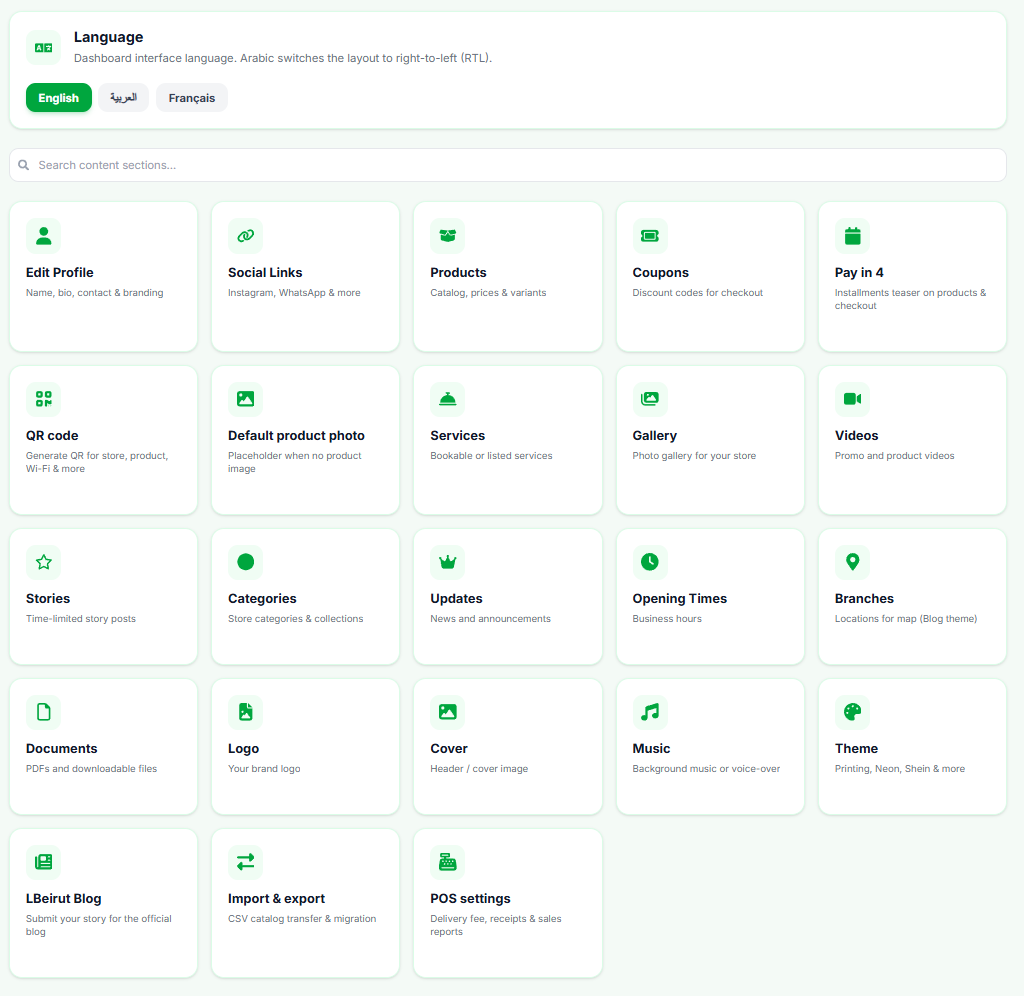
Language
Dashboard interface language. Arabic switches the layout to right-to-left (RTL). English and Français change the admin UI only — not your storefront language for customers.
Recommended work order
- Edit Profile (WhatsApp + shipping + policies)
- Logo and Cover
- Products then Categories
- Theme and colors
- QR code for sharing
- Other media and offers as needed
Cards as they appear in the hub
- Edit Profile
- Name, bio, contact & branding
- Social Links
- Instagram, WhatsApp & more
- Products
- Catalog, prices & variants
- Coupons
- Discount codes for checkout
- Pay in 4
- Installments teaser on products & checkout
- QR code
- Generate QR for store, product, Wi‑Fi & more
- Default product photo
- Placeholder when no product image
- Services
- Bookable or listed services
- Gallery / Videos / Stories
- Store media and time-limited posts
- Categories
- Store categories & collections
- Updates / Opening Times / Branches
- News, hours, map locations
- Documents / Logo / Cover / Music
- Files, brand visuals, audio
- Theme
- Printing, Neon, Shein & more
- LBeirut Blog
- Submit your story for the official blog
- Import & export
- CSV catalog transfer & migration
- POS settings
- Delivery fee, receipts, reports & counter features
- POS staff
- Managers & cashiers, login codes, PIN, branch, and permissions — sign-in at pos.lbeirut.website
Search inside Content
In “Search content sections…” type words like “shipping”, “QR”, or “theme” to find the card fast instead of long scrolling on mobile.
NextProfile, WhatsApp & shipping